
AI grocery list: prompts to copy and what to check before you shop
An AI assistant can turn your dishes, the number of people and what you have at home into a grocery list with quantities, grouped by aisle. On its own it does not see this week’s promotions or the prices in your shop, and when it searches the web, the results can be incomplete, outdated or incorrect, according to OpenAI (help page, October 2026). Treat the list as a draft and check it before you leave.
Rappn compares the current promotions of 7 Swiss retailers, updated daily: free, no subscription.
Make your list in Rappn, freeIn short: AI helps you give a grocery list its shape (ingredients, quantities for the number of people, aisles, what you already have), but it has no data of its own on this week’s promotions and prices. With web search it consults a few pages, and OpenAI writes that the results can be incomplete, outdated or incorrect. Below are five prompts to copy and six checks to make before you leave.
Updated October 2026. Sources: OpenAI, “Searching the web with ChatGPT” and “Does ChatGPT tell the truth?”; Anthropic, “How up-to-date is Claude’s training data?” and “Claude is providing incorrect or misleading responses” (16 March 2026); Google, “Learn about responses from Gemini Apps”; foodwaste.ch (data from ZHAW and the Federal Office for the Environment FOEN, interim report 2025) (viewed on 13 October 2026).
Can you make a grocery list with AI?
Yes. An AI grocery list is a list that a general-purpose AI assistant, for example ChatGPT, Claude or Gemini, writes for you from what you describe: dishes, number of people, pantry, preferences. You can ask it to turn three dinners into ingredients, scale the quantities for 2 or 5 people, remove what you already have, merge duplicates and group the items by aisle. For this structuring work it is useful, as long as the result stays a first draft, as OpenAI also recommends.
The limit is the data it does not have: this week’s promotions, the prices in your shop, what is on the shelves. So you split the work: the assistant provides the list, you add what only you know (pantry, portions, shop) and you check the promotions at the source.
Once you have checked the AI’s list, this is how it looks in Rappn: each item with a starting price, an estimated price for the whole list, and the items you have bought ticked off.
Make your list in Rappn, freeFree, no subscription · iOS & Android
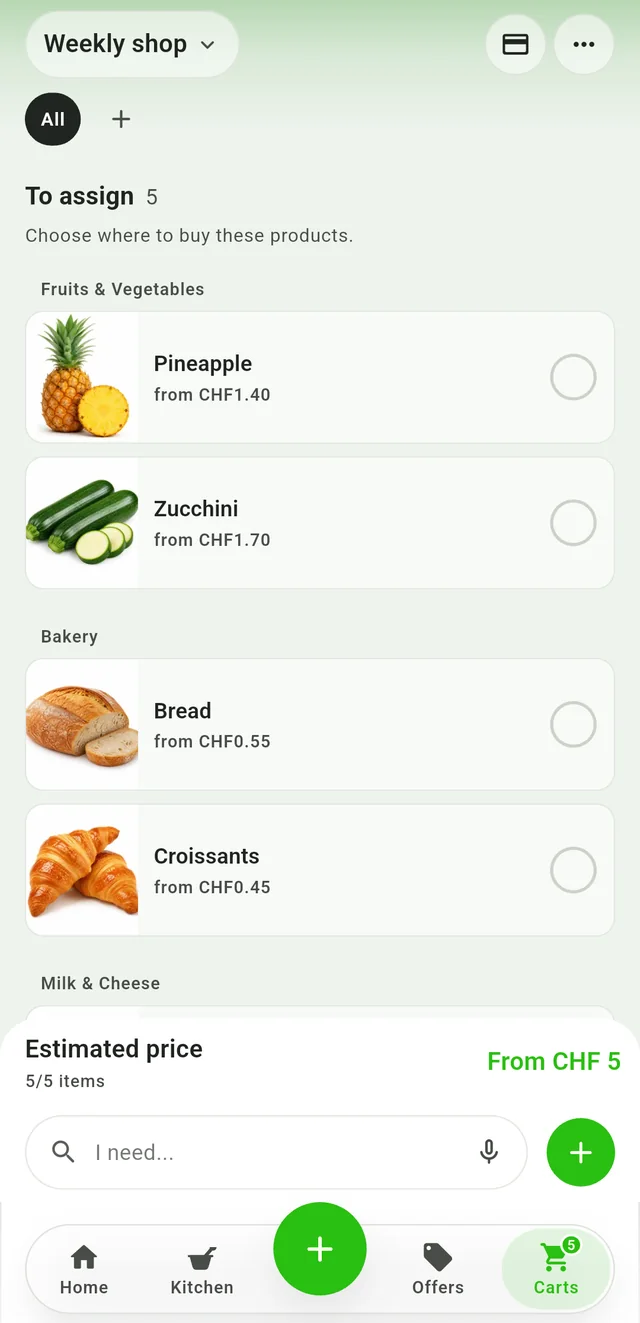
Estimate the list
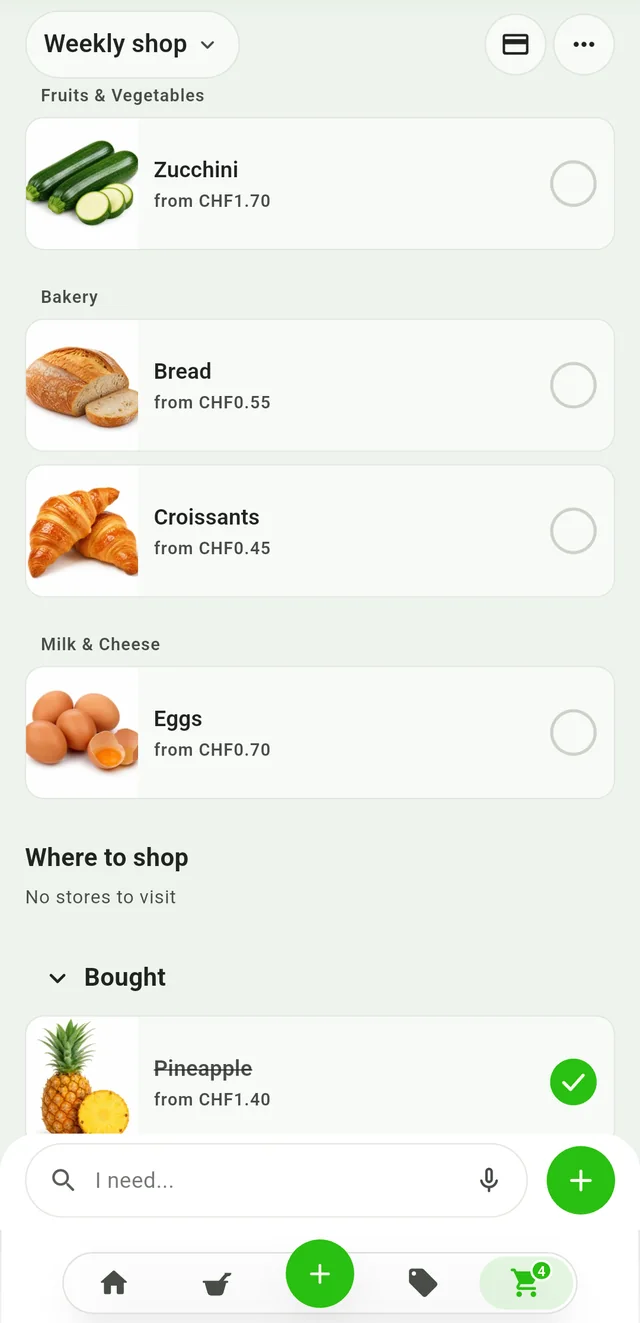
Tick off what you bought
Which prompts work for a grocery list?
A good prompt says who is eating, what you are cooking, what you already have and what format you want. Replace the parts in square brackets and leave the prices out: the assistant does not see the prices in your shop.
- From dishes to a list. “I am cooking these dishes for [number] people: [dish 1], [dish 2], [dish 3]. Write me the grocery list with quantities in grams, litres or pieces, by aisle, without prices.” To have the dishes suggested too: AI meal planner.
- Use what you have. “I already have at home: [list]. For dinners on [days] for [number] people, list only what I still need to buy and flag ingredients used in more than one dish.” Ideas from what you have: what to cook with what you have.
- Put a written list in order. “Here is my list: [paste the list]. Merge duplicates, adding up their quantities, and group by aisle, in the order I walk through the shop: [order of the aisles].” If you start from recipes: turning recipes into a shopping list.
- Separate the essentials from the promotions. “Split the list into three groups: essential, only if on promotion, optional. Do not write prices or promotions.” You check the second group against this week’s promotions afterwards.
- Make doubts visible. “Read the list again: flag the quantities and items you are not sure about, and ask me a question if you lack information, instead of making something up.” This is not a guarantee: the check stays with you.
Ask for quantities in grams, litres or pieces and for product types (“short pasta”) rather than brands: you choose the brand in front of the shelf. Write only what the list needs, without your name, address or card details; the general rules on data are in the guide to ChatGPT and personal data.
What doesn’t AI know about your shopping?
| Task | What a general AI assistant can do | What it cannot know (sources: help pages of OpenAI, Anthropic and Google, 13 October 2026) |
|---|---|---|
| From dishes to a list | List ingredients and quantities for the number of people you give | How much you really eat and the pack sizes in your shop: you review the quantities yourself |
| This week’s promotions | Without web search, none: its knowledge stops at a date. With search, it consults some sources on the web | Which promotions apply now, until when and where; the results can be incomplete, outdated or incorrect, and a page can stay out of reach |
| Prices | Add up the prices you give it | Today’s price in your shop: a figure written by the assistant is unchecked |
| Products | Suggest product types | Whether a product exists and is stocked where you shop |
What the vendors write (13 October 2026). OpenAI: its models are trained on data up to a certain point and, without tools such as search, their answers do not include later events; search results and citations can be incomplete, outdated or incorrect, so it is worth opening the cited source. Anthropic: each Claude model is trained on data up to a certain date (as of October 2026, its list gives June 2026 for the newest models) and may not be aware of later events and information. Google: Gemini can present inaccurate information as fact and can misdescribe how it works, for example how it cites sources or provides fresh information.
So it is not enough to ask the assistant whether it checked the promotions (called Aktionen in German): see whether it cites a source, open the page and check the date. The guide to ChatGPT and grocery deals covers this in detail.
How do you check the list before you leave?
With six checks that take a few minutes. Treat the list as a draft: OpenAI recommends using ChatGPT as a first draft, not a final source.
- Compare with what you have. Look in the fridge, pantry and freezer and cross out what you already have. In Switzerland 26% of food losses arise in households (2024 estimate, foodwaste.ch citing ZHAW and FOEN), and the causes include buying more than needed and forgetting food in the fridge.
- Review the quantities. Check that the portions cover everyone and that ingredients used in several dishes (onions, oil, milk) appear only once, with the total.
- Turn suggestions into real products. Every product name is a suggestion, not a confirmation: look at the shelf or in the shop’s catalogue for what you do not know, and ignore the prices the assistant wrote.
- Check the promotions. Look up the “only if on promotion” items in this week’s promotions and check how long they run.
- Open the sources if it searched the web. OpenAI and Anthropic advise opening the cited sources; OpenAI adds that you should check when the page was published or updated.
- Reorder and share. Put the items in the order in which you walk through the shop (or by shop, if you use two) and send the list to whoever is shopping: that way nobody buys the same thing twice.
AI list and this week’s promotions: how to bring them together
In two steps: the assistant gives you the list in three groups (prompt 4), then you look up the “only if on promotion” items in this week’s promotions. Your first step today is to ask for that list.
For the part the assistant cannot see, you can use Rappn, a free Swiss app (iOS and Android) that compares the current promotions of seven Swiss retailers and turns receipts into a spending overview. You write the items into the app’s list: it shows an estimated price for the whole list (how it works: grocery list with prices) and, for each item, products with prices by store; a filter keeps only those on offer. Prices are indicative; the promotions are updated daily as the chains publish them and can be filtered by canton (Swiss state). You can share the list with your household and edit it together, and for a product you follow you get an alert when it goes on offer. There is no subscription. Rappn covers only the grocery line of your budget, not rent, insurance or taxes. Rappn is building an AI assistant for groceries: you can join the waitlist.
Updated: .
Why Rappn?
Rappn is an independent grocery price comparison app in Switzerland, with no commercial agreements with any retailer. Our comparisons are truly independent.
- 100% free: no subscription, no hidden costs
- Neutral: no commercial agreements with Migros, Coop, Aldi, Lidl, Denner, Aligro, or Otto’s
- Updated daily, as soon as the chains publish their deals
- The chains’ deals in one place: search, filter, compare, no subscription
- Meal planner in the Kitchen tab: plan the week, send the ingredients to your list

Ready to save on groceries?
Install Rappn and compare for yourself this week. No account required.Scan the code, install Rappn and compare current offers. No account needed.




Frequently Asked Questions
Can ChatGPT make a shopping list?
Yes: if you describe your dishes, the number of people and what you have at home, ChatGPT can write the ingredients with quantities and group them by aisle. It does not see this week’s promotions or the prices in your shop unless it searches the web, and OpenAI warns that search results can be incomplete, outdated or incorrect (help page, viewed on 13 October 2026). Treat the list as a draft and check it before you leave.
Which prompt should I use for a weekly list for two?
For example: “There are two of us and we are cooking four dinners this week ([dishes]); I already have [list]; write the grocery list with quantities in grams, litres or pieces, by aisle, without prices.” Then check the quantities and the products, because they are suggestions.
Does an AI assistant see current prices and promotions?
Not on its own. According to OpenAI and Anthropic, models are trained on data up to a certain date and may not be aware of what happened after that; according to OpenAI, even web search results can be incomplete, outdated or incorrect (help pages, 13 October 2026). Treat any price written by an assistant as unchecked and verify it in the shop or in this week’s promotions.
Is it safe to give an AI my pantry or my diet?
A list of dishes and ingredients is not very sensitive, but a diet can say something about your health. Write only what the list needs, without your name, address or card details, and look at the data settings of the service you use. The general rules are in the guide to ChatGPT and personal data.
Can I do it in Rappn?
For the second half of the job, yes: you write the items in the Rappn list and see an estimated price for the whole list and, for each item, products with prices by store, with a filter for those on offer (prices are indicative). The current promotions of seven Swiss retailers are updated daily as the chains publish them. The app is free, with no subscription.