
Shopping list app Switzerland: which app does what, and who pays for it?
Choose a shopping list app by the job you need it to do: coordinate a household, remember quantities or compare offers before buying. Test sharing, offline access, language and the cost of any extras on your own phones. A retailer’s list and a comparison tool serve different purposes. The guide below compares those approaches without assuming that one app suits every household.
Rappn compares the current promotions of 7 Swiss retailers, updated daily: free, no subscription.
Try the list in Rappn, free
Updated editorial criteria: 22 September 2026. This guide is not a current performance test of individual apps. Check features, fees and privacy in each provider’s current documentation.
A useful shopping list app fits the way your household shops. Start with the problem you want to solve: forgotten items, duplicate purchases, unclear quantities or uncertainty about prices. These are different tasks. A long feature list does not tell you whether everyone can open and update the same list while shopping. Test a small real list before moving your household routine into a new service.
Rappn is an independent Swiss price-comparison app, with no commercial agreements with any retailer.
What are the main types of shopping list app?
A dedicated list app focuses on entering, sorting and checking off products. A retailer app may place a list beside that retailer’s catalogue, account or customer benefits. A general notes app offers a flexible place to record items. An offer comparison tool helps you review prices from different retailers. Treat these as approaches to evaluate, not fixed promises about every app in a category. Features, access conditions and pricing can change.
| Criterion | Practical check |
|---|---|
| Sharing | Edit a quantity and check the result on both phones. |
| Access | Check account requirements and behaviour without a connection. |
| Cost | Read the current subscription and purchase terms. |
| Data | Try copying or exporting the list. |
The screens show a list grouped by store and the products behind one list item, two points you can test in any list app yourself.
Try the list in Rappn, freeFree, no subscription · iOS & Android
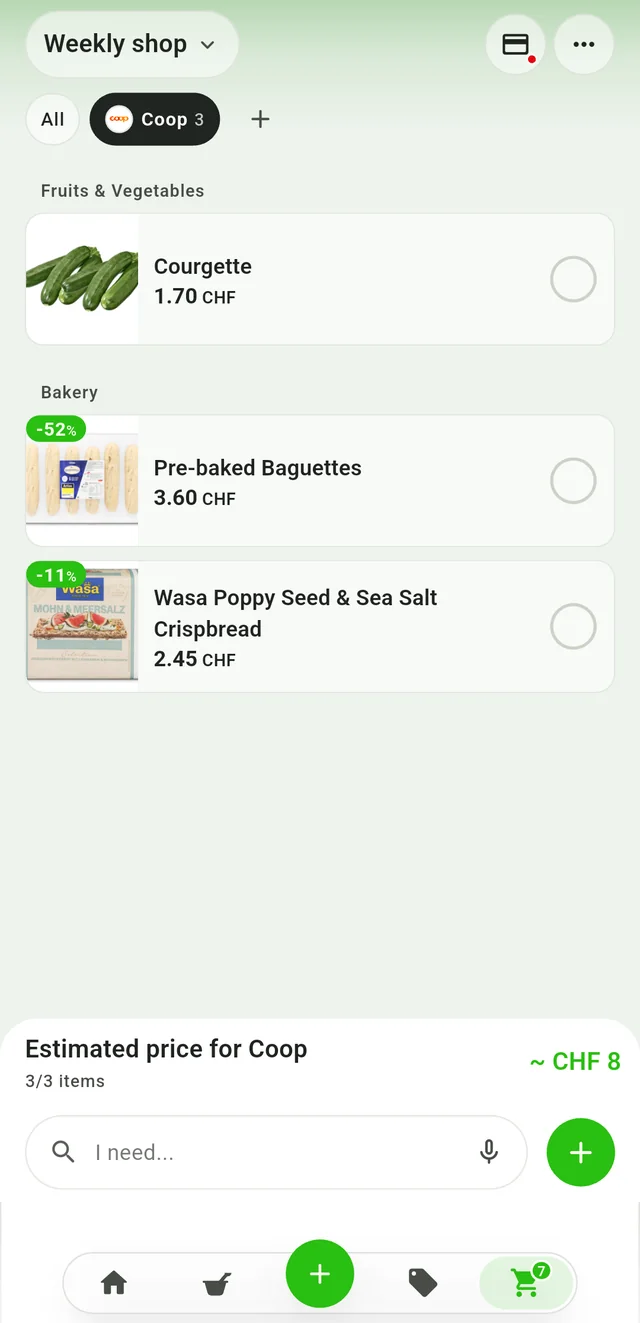
Group the list by store
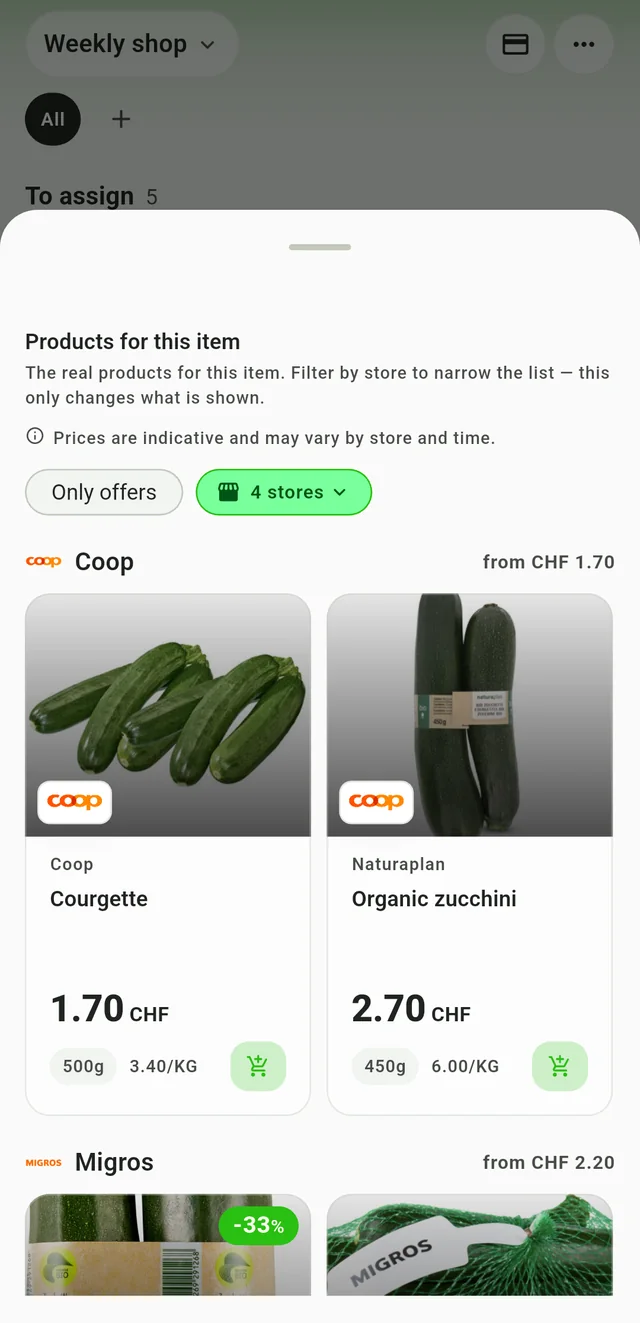
See products per item
How should you test a shared list?
Invite the person who normally shares your shopping and add a few familiar products. Specify the quantity and any important variant, such as lactose-free milk or a particular pack size. Edit an item on one phone and check what appears on the other. Try checking products off, undoing a mistake and reopening the list after the connection drops. Confirm whether each participant needs an account and whether both phones support the required version.
What matters besides adding products?
Review the languages you need, accessibility settings and how the list behaves in a shop with weak reception. Check whether you can export or copy the list before relying on it. Read the current privacy information and the permissions requested during setup. Distinguish a free download from free access to the functions your household needs; subscriptions and optional purchases may apply. An advertisement-free claim should be checked against the current app description and settings.
How do list tools and price comparison work together?
A list records what you intend to buy. A price comparison needs matching products, quantities, pack sizes and valid offers. Seeing a flyer in an app does not by itself establish the cheapest basket. On Rappn’s public offer pages, check the listed retailer, canton and validity before comparing an offer. Confirm conditions and availability with the retailer. A lower pack price can still mean a higher price per kilogram or litre.
One check not every household needs is the step from recipe to list. In the Kitchen in Rappn, the Planner lists the ingredients of a chosen day's recipes, sets aside "You have it at home" and adds the rest to a cart such as "Weekly shop". The printable grocery list template shows the paper version, recipes to shopping list covers the step itself, and how to meal plan in Switzerland the planning behind it.
When does using two tools make sense?
Keeping one shared list and opening a comparison tool before the shop can work if it avoids duplicate maintenance. Agree which list is the household’s reference and where substitutions will be recorded. If moving between tools adds work, simplify the routine. Judge the setup after actual shopping trips: could both people find the list, understand the quantities and see what was already bought? The useful result is a reliable routine, not the number of apps installed.
How can you avoid depending on one list service?
Before switching, check what happens to your entries when a phone is replaced or a household member stops using the service. Can you copy the list as text? Can you revoke an invitation without deleting everyone’s shopping? What happens to stored information after an account is deleted? Consult the current help pages and privacy policy, and record anything unclear before deciding. For a simple shared list, everyone should know where the reference entries live and who can change them.
How should you evaluate a real shopping test?
Use an ordinary shop as your trial, rather than just opening the welcome screen. Add quantities, acceptable substitutions and an item familiar to only one person. In the store, check whether those details make sense without another message. Afterwards, review the entries left open and why they remained there. Was a product unavailable, entered twice or checked off on only one phone? Those observations help you choose. A polished screen or many ratings cannot replace this household test.
Related guides
one app for deals, list and loyalty cards · shared shopping list in Switzerland · grocery price comparison app for Switzerland · current offers · meal planning app for Switzerland
Rappn is building an AI assistant for groceries: you can join the waitlist.
Updated: .
Why Rappn?
Rappn is an independent grocery price comparison app in Switzerland, with no commercial agreements with any retailer. Our comparisons are truly independent.
- 100% free: no subscription, no hidden costs
- Neutral: no commercial agreements with Migros, Coop, Aldi, Lidl, Denner, Aligro, or Otto’s
- Updated daily, as soon as the chains publish their deals
- The chains’ deals in one place: search, filter, compare, no subscription
- Meal planner in the Kitchen tab: plan the week, send the ingredients to your list

Ready to save on groceries?
Install Rappn and compare for yourself this week. No account required.Scan the code, install Rappn and compare current offers. No account needed.

Frequently Asked Questions
Which shopping list app is best in Switzerland?
Choose according to your household’s needs. Test sharing, quantities, language, access requirements and offline behaviour with a small real list before committing to a service.
How can I check whether a list app has advertising?
Read the current app description, subscription terms and privacy information. Check the app itself for sponsored content; a free download alone does not tell you how the service is funded.
How do I check who provides a shopping list app?
Check the publisher named in the app store, the website’s legal information and the privacy policy. Make sure you understand which organisation operates the service.
What should I check before sharing a list?
Confirm who needs an account, how invitations work and whether updates appear on both phones. Test checking off an item and correcting a quantity before your next shop.
Does an offer in a list app prove it is the cheapest?
No. Compare matching products and pack sizes, use the price per unit and check the offer dates and conditions. A flyer or promotion is not a complete basket comparison.
Is it worth running two apps side by side?
It can be useful to keep a shared list and consult offers separately. Keep one reference list so that changes and purchased items do not have to be entered twice.