
Printable Grocery List Template, Sorted by Aisle
A list that follows the route through the supermarket means one round and no duplicates. Download the free PDF template with eight sections and see how to use it with your weekly meal plan.
Rappn compares prices across all 7 chains live: free, no account.
Build your list in Rappn, free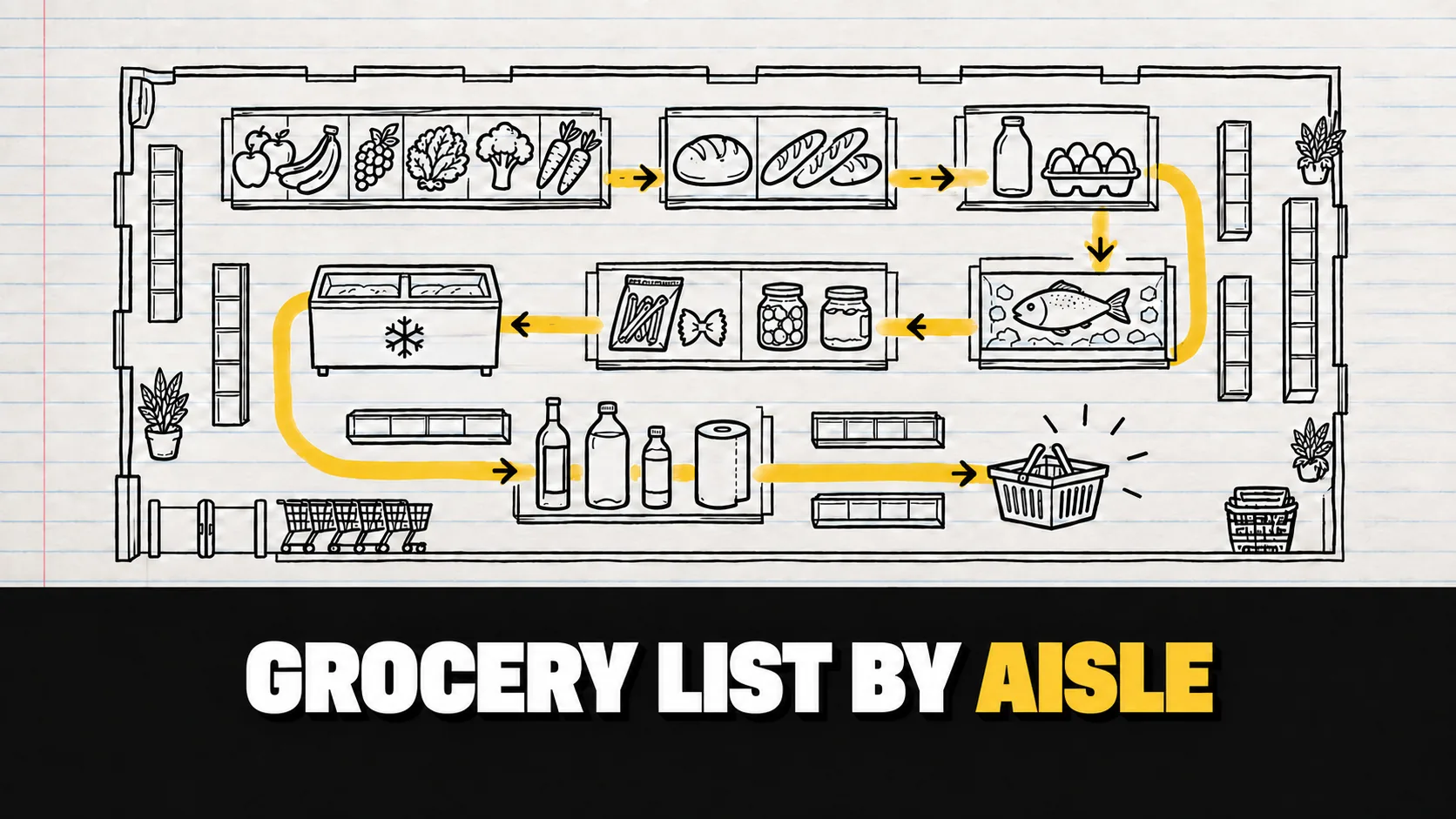
A grocery list sorted by aisle follows the route you walk through the supermarket: fruit and vegetables, bread and bakery, dairy and eggs, meat and fish, dry goods, frozen, drinks, household. You pick up everything on the first pass and see at a glance what is missing. The Rappn template is a free A4 PDF with these eight sections and lines with a tick box. Download the grocery list template as a PDF (A4, free).
Updated October 2026. Sources: savefood.ch, “Einkaufsplanung” (shopping list, and picking up chilled products last); FSVO (Federal Food Safety and Veterinary Office), “Hygiene im Umgang mit Lebensmitteln” (cold chain). The order of the aisles is a typical order, not a rule: it varies from store to store.
Why sort a grocery list by aisle?
A list written in the order things come to mind sends you across the store two or three times: milk at the start, then the salad, then back to the fridges for yogurt. Grouping by aisle has three practical benefits. You make a single round. You spot duplicates before you buy them, because all the dairy sits in the same section. And you can deliberately leave the chilled products for the end of your round: savefood.ch advises putting chilled items in the trolley at the end and, if needed, using a cool bag, and the FSVO recommends putting them in the fridge or freezer as soon as you get home.
The underlying reason is the same as for any list: according to savefood.ch, with a list you buy only what you really need, and that prevents food waste before you even get home.
In the app the list groups items by category and by store and shows what you have already picked up as you shop.
Build your list in Rappn, freeFree, no account required · iOS & Android
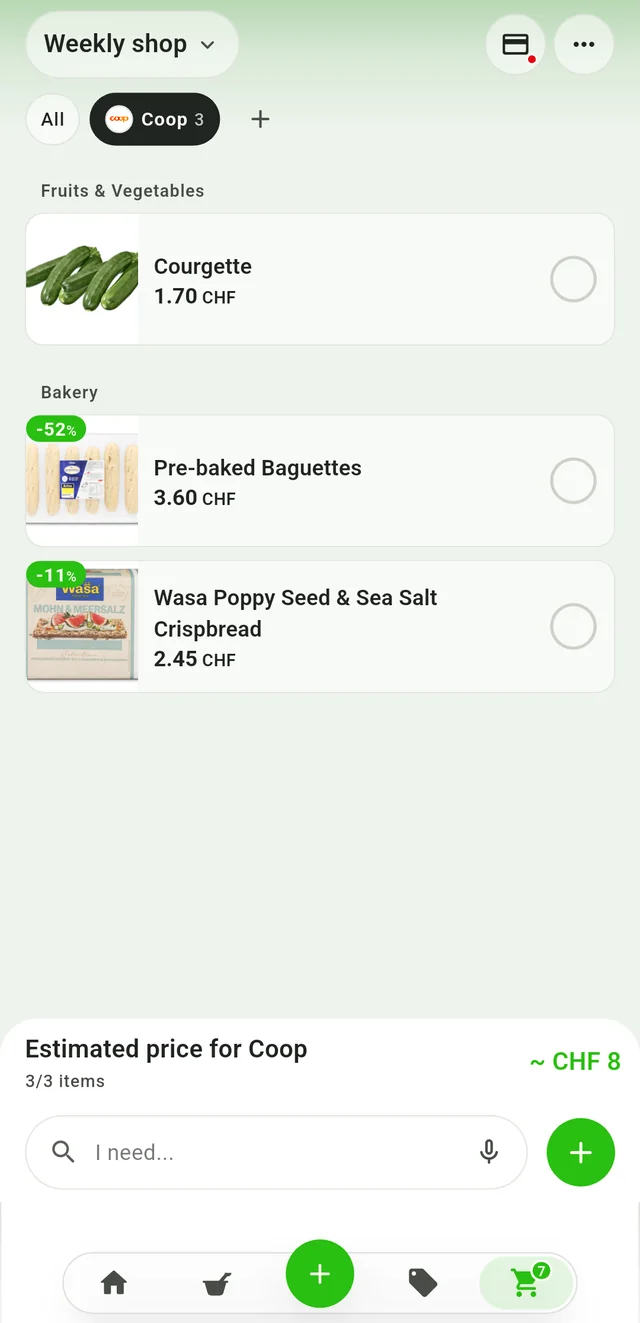
Sorted by category and store
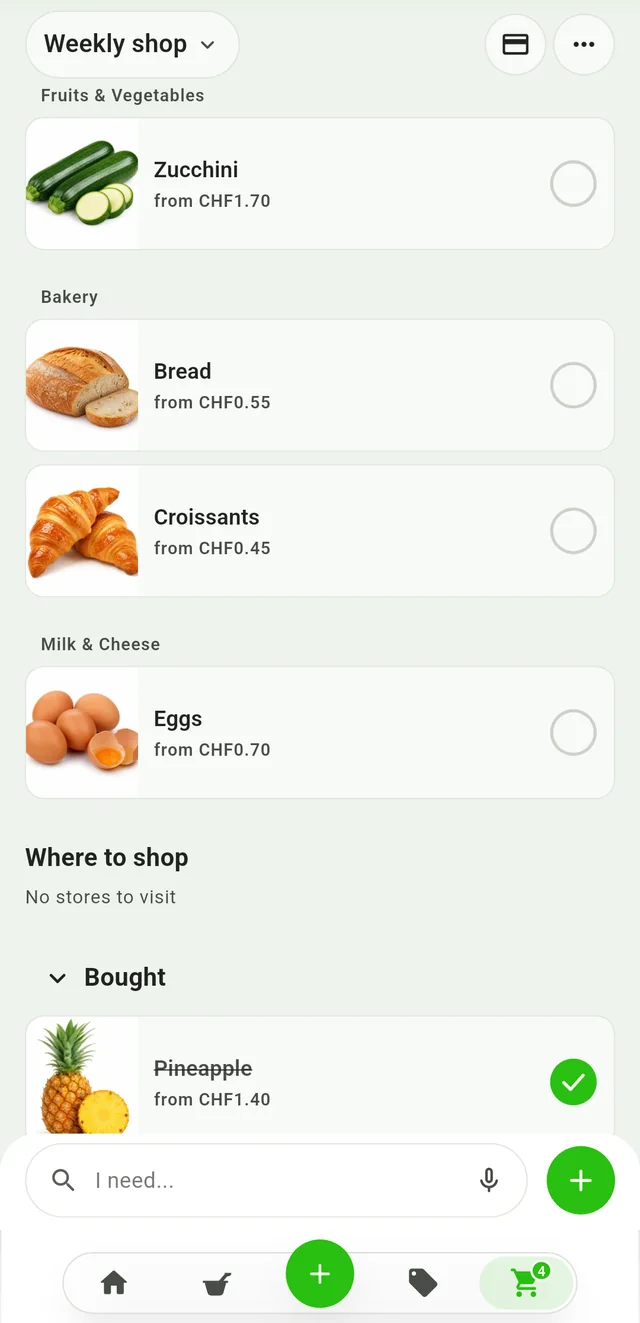
Tick off what you bought
In what order are the aisles of a Swiss supermarket?
| Section on the template | What to write there | Tip |
|---|---|---|
| Fruit and vegetables | Fruit, vegetables, herbs, salads | Choose what is in season; the seasonal produce calendar helps |
| Bread and bakery | Bread, rolls, fresh puff pastry | Bread freezes well in slices |
| Dairy and eggs | Milk, yogurt, cheese, butter, eggs | Check first what is already open in the fridge |
| Meat and fish | Meat, poultry, fish, cold cuts | Chilled products: better towards the end of your round |
| Dry goods (pasta, rice, tins) | Pasta, rice, tins, flour, oil, coffee | Deals are easy to use here, without hurry: these items keep |
| Frozen | Vegetables, fish, ice cream | Last of all, with a cool bag |
| Drinks | Water, juice, beer, wine | Heavy: at the bottom of the trolley |
| Household | Detergent, paper, bin bags | These keep: you can wait until they are on offer |
How to use the printable template
- Start from the meal plan. If you fill in the printable meal planner, copy its "To buy" column into the right sections.
- Cross off what you already have. A quick look at the fridge and cupboards before you leave avoids duplicates.
- One sheet per store. If you shop at two stores, use two sheets and write the name on the "Store" line.
- Tick as you buy. The boxes show at a glance what is still left to pick up.
For the step from meal plan to list, with a complete checklist, see the guide to planning your weekly grocery shop; the whole method is in the guide to how to meal plan.
And the list in the Rappn app?
The digital list in Rappn (iOS and Android) does the grouping for you: items are sorted by category, for example "Fruits & Vegetables", "Bakery" and "Milk & Cheese". At the top you choose whether to see all items or only those of one store. Items still under "To assign" are assigned to the supermarket where you want to buy them, and for each one you see the real products with prices and, with "Only offers", just those on offer. The list shows an estimated price per store and how many stores to visit; as you shop, ticked items move down to "Bought". You can keep several carts, for example "Weekly shop" and another for a dinner with guests, and share them with family or flatmates (see the guide to a shared shopping list). Prices are indicative and vary by store and time. Rappn is free, needs no account and has no commercial agreements with any retailer.
Updated: .
Why Rappn?
Rappn is an independent grocery price comparison app in Switzerland, with no commercial agreements with any retailer. Our comparisons are truly independent.
- 100% free: no subscription, no hidden costs
- Neutral: no commercial agreements with Migros, Coop, Aldi, Lidl, Denner, Aligro, or Otto’s
- Updated daily, as soon as the chains publish their deals
- The chains’ deals in one place: search, filter, compare, no account needed
- Meal planner in the Kitchen tab: plan the week, send the ingredients to your list
Ready to save on groceries?
Install Rappn and compare for yourself this week. No account required.Scan the code, install Rappn and compare current offers. No account needed.
Built in Switzerland, for Switzerland

Frequently Asked Questions
Where can I find a free printable grocery list?
On this page: the Rappn template is a free A4 PDF with eight sections in a typical supermarket order and lines with a tick box.
In what order should I write my grocery list?
In aisle order: fruit and vegetables, bread and bakery, dairy and eggs, meat and fish, dry goods, frozen, drinks, household. The real order varies from store to store.
Why should I pick up frozen food last when grocery shopping?
To keep the cold chain unbroken: savefood.ch advises picking up chilled products last and using a cool bag, and the FSVO says to put them in the fridge or freezer straight away at home.
Is there an app for a shared grocery list for the family?
Yes. In Rappn you create several carts and share them with family or flatmates, and items are grouped by category and by store, with an estimated price for the list.