
Printable meal planner: the free PDF template
An A4 sheet to stick on the fridge, with seven days, breakfast, lunch and dinner, a shopping column and space for notes. Download the free PDF here, see how to fill it in and find a ready-made example week.
Rappn compares prices across all 7 chains live: free, no account.
Plan your week in Rappn, free
Rappn's printable meal planner is a free A4 PDF: seven rows from Monday to Sunday, columns for breakfast, lunch and dinner, a "To buy" column next to every day, a box for notes and a line for the food to use first. Print it, fill it in on Wednesday evening with what is in your fridge and the week's deals, stick it on the fridge and copy the "To buy" column onto your shopping list. Download the meal planner template as a PDF (A4, free).
Updated October 2026. Sources: savefood.ch, “Einkaufsplanung”; foodwaste.ch, “Zahlen und Fakten zu Food Waste” (viewed on 5 October 2026, based on ZHAW/FOEN data, interim report 2025); Coop press release of 21 January 2025 and Migros announcement of January 2026 (also covering Denner) on promotions starting on Thursday. The template is made by Rappn and free for personal use.
What is on the weekly meal planner template?
| Part of the sheet | What it is for |
|---|---|
| "Week of" | The start date: handy if you keep your sheets and want to repeat a week that worked |
| Seven rows, Monday to Sunday | One row per day, so you can see at a glance which evenings are busy and which are free |
| Columns "Breakfast", "Lunch", "Dinner" | Fill in all three or just dinner: for many people it is the meal that matters most to plan |
| Column "To buy" | The ingredients still missing for that day's meals, to copy onto your list |
| Box "Notes" | Guests, birthdays, evenings out, leftovers to finish |
| Line "Use first" | The fridge items closest to their date: the plan starts here |
If you would rather keep a separate shopping list, there is also the printable grocery list, sorted by store section: the two sheets together cover the whole week.
The digital version of the template: the same week in Rappn’s Kitchen, with each day’s meals and the list one tap away.
Plan your week in Rappn, freeFree, no account required · iOS & Android
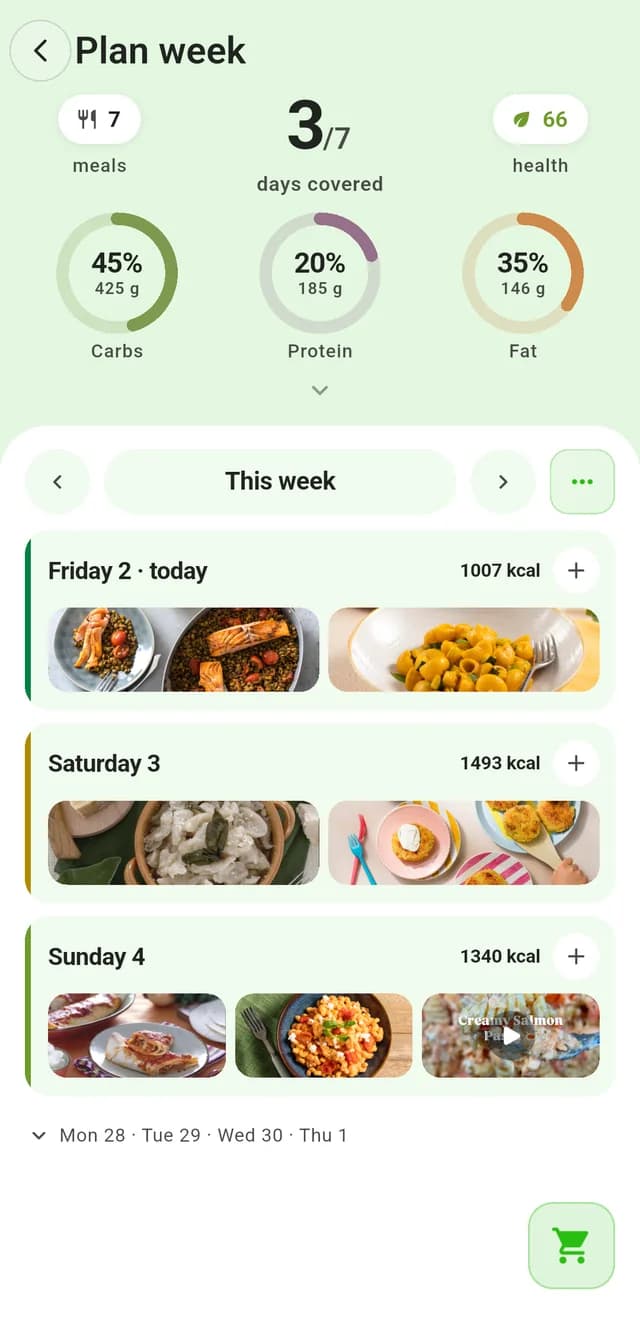
See the whole week
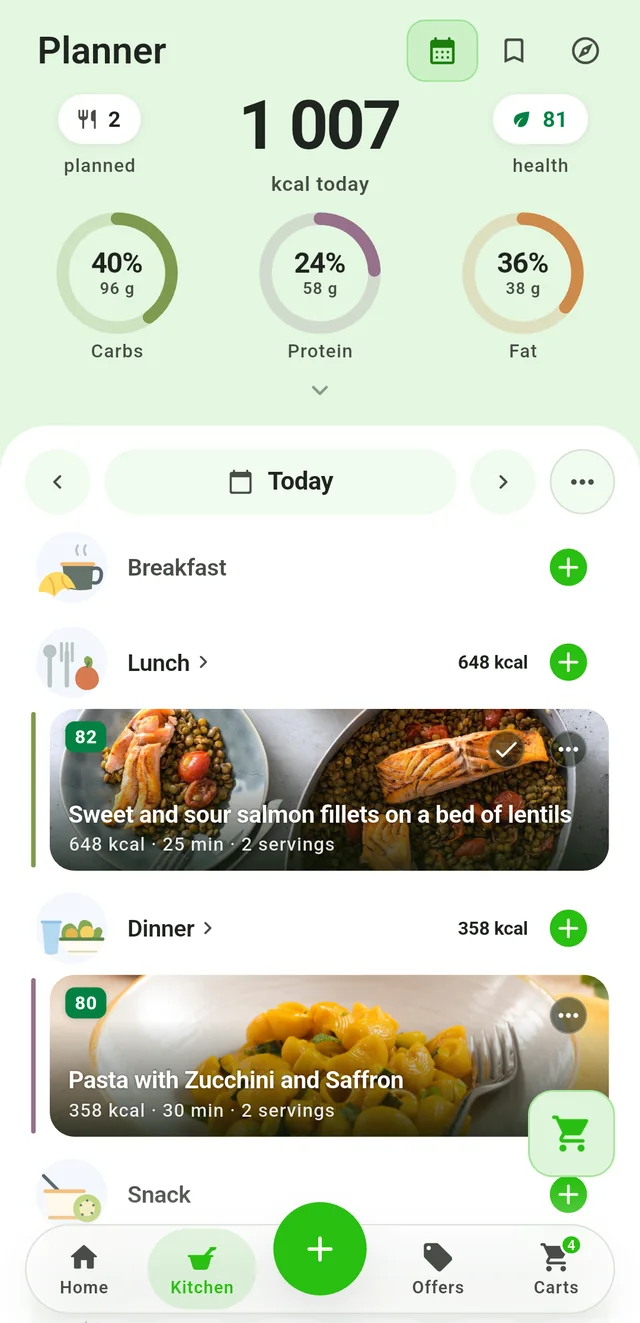
Plan the day
How do you fill in a meal planner, step by step?
The order matters: start from what you already have, not from what you feel like eating. This is the first tip from savefood.ch, the Swiss programme against food waste: look at your fridge, freezer and cupboard before you decide what to buy.
- The "Use first" line. Open the fridge and write down the three items that need eating first: half a cabbage, an open carton of cream, some fresh cheese.
- Busy evenings. Mark the evenings when you are out or home late: those get a very quick dish or nothing at all.
- Dinners. Pick four or five dinners and build at least one around the items on your "Use first" line. For ideas, check what is in season in the fruit and vegetable calendar and what is in this week's deals.
- Two empty boxes. Leave two dinners blank, or write "leftovers" and "free": they are there for surprises.
- Lunches and breakfasts, if you like. Often it is enough to write "leftovers from dinner" in the next day's lunch.
- The "To buy" column. For each day, note only what is really missing, then copy everything onto one single list.
The best moment to fill it in is Wednesday evening: at Migros, Coop and Denner the weekly promotions start on Thursday, so you plan with the new deals and shop from Thursday. The reason is explained in the guide to the best day to buy groceries.
An example of a filled-in week
| Day | Lunch | Dinner | To buy |
|---|---|---|---|
| Monday | Leftover beef stew | Vegetable soup with the veg to use up | Small pasta, celery |
| Tuesday | Vegetable soup | Rösti with a fried egg | Potatoes, eggs |
| Wednesday | Rice salad | Leftovers | Nothing: time to write the new plan |
| Thursday | Canteen | Oven-baked chicken legs with potatoes (double batch) | Chicken on offer, potatoes |
| Friday | Salad with the leftover chicken | Mushroom risotto | Rice, mushrooms |
| Saturday | Out | Free: pizza or an invitation | Nothing |
| Sunday | Beef stew with potatoes (double batch) | Light soup | Stewing beef, potatoes |
Notice the thread: Thursday's chicken becomes Friday's salad, Sunday's stew becomes Monday's lunch, Monday's soup becomes Tuesday's lunch. This chaining of meals is what makes a plan more useful than seven recipes picked one by one. If you are short of an idea for emptying the fridge, there is the guide what to cook tonight with what I have.
Which tricks help you stick to the plan?
- One theme per day. Lentils on Monday, pasta on Tuesday, fish on Friday, the long cook on Sunday: with a fixed theme you choose among a few options instead of every recipe in the world.
- The leftovers evening. Writing it down stops leftovers sitting in the fridge until they have to be thrown away. According to foodwaste.ch, cooking more than people eat and not reusing leftovers is one of the main causes of waste at home.
- Cook a double batch. A long cook made in double quantity becomes a lunch or a second dinner: it is the simplest way to have a meal ready on busy days.
- Keep the sheet in view. Stuck on the fridge, the plan is visible to the whole household: whoever gets home first knows what to cook.
- Keep the sheets that worked. After a few weeks you have an archive of tested plans to reuse when there is no time to think.
The full method, with the rhythm of the promotions and a comparison of the different approaches, is in the guide on how to plan a weekly menu in 5 steps.
And the digital version in Rappn's Kitchen?
The paper sheet has one limit: you copy the "To buy" column by hand, and you look for the deals yourself. In the Kitchen tab of the Rappn app (iOS and Android) the same plan exists in digital form. The "Planner" view shows the day with breakfast, lunch, dinner and snack, and for each recipe the kcal, the minutes and the servings; "Plan week" shows all the days with their planned meals and how many are covered. When you pick a day, the app lists the ingredients of its recipes, separates what you have at home from what is listed under "You might already have", and sends them to the "Weekly shop" list, where for each item you see the products by store and where they are on offer. Nutrition values are recipe data, not medical advice; prices are indicative. Rappn is free, needs no account and is independent of any retailer. You can also use both: the sheet on the fridge for everyone, the app for the shopping.
Updated: .
Why Rappn?
Rappn is an independent grocery price comparison app in Switzerland, with no commercial agreements with any retailer. Our comparisons are truly independent.
- 100% free: no subscription, no hidden costs
- Neutral: no commercial agreements with Migros, Coop, Aldi, Lidl, Denner, Aligro, or Otto’s
- Updated daily, as soon as the chains publish their deals
- The chains’ deals in one place: search, filter, compare, no account needed
- Meal planner in the Kitchen tab: plan the week, send the ingredients to your list
Ready to save on groceries?
Install Rappn and compare for yourself this week. No account required.Scan the code, install Rappn and compare current offers. No account needed.
Built in Switzerland, for Switzerland

Frequently Asked Questions
Where can I find a free printable meal planner?
On this page: Rappn’s template is a free A4 PDF with the seven days, breakfast, lunch and dinner, a "To buy" column, notes and a line for the food to use first.
How do I fill in a weekly meal planner?
Start with the food to use first, mark the busy evenings, pick four or five dinners, leave two boxes free for leftovers and surprises, then write only what is missing in the shopping column.
When is the best time to plan the week’s meals?
Wednesday evening: the weekly promotions at the big Swiss supermarkets start on Thursday, so you plan with the new deals and shop from Thursday.
Does a weekly meal planner template work for a family?
Yes: every box has room for two lines, and a sheet stuck on the fridge is visible to everyone. For quantities that fit the number of people, the guide on portion sizes per person gives basic amounts.
Is there an app for meal planning with a shopping list?
Yes. In Rappn’s Kitchen you plan meals on the days, then send a day’s ingredients to your shopping list and see which supermarket has them on offer. The app is free and needs no account.