
Meal Planner App in Switzerland: Plan the Week, Then Do the Groceries
A meal planner app is worth it when it connects the plan to your shopping list and this week’s prices. In Rappn’s Kitchen you plan meals day by day, send the ingredients to your list and see where each item is on offer.
On offer this week: chicken, meat, fish, pasta
Canton of Zurich, as of 24 Oct 2026: the lowest verified price per kilo among the promotions for each main ingredient, with the chain and validity.
| Item | Lowest verified unit price | Product | Chain | valid until | Promotions |
|---|---|---|---|---|---|
| Chicken | CHF 5.92/kg | Chicken drumsticks 2.5 kg | Aligro | Sat 24 Oct | 28 at 4 chains |
| Meat (no poultry) | CHF 5.50/kg | Bell Pork knuckle 1kg 1 kg | Aligro | Sat 24 Oct | 108 at 3 chains |
| Fish | CHF 4.90/kg | Fresh sardines 1 kg | Aligro | Sat 24 Oct | 65 at 5 chains |
| Pasta | CHF 2.19/kg | Barilla Spaghetti n.5 5kg 5 kg | Otto’s | no verified end date | 136 at 5 chains |
Method: current promotions of the 7 chains in the Rappn database, canton of Zurich, as of 24 Oct 2026. Promotions with a real price cut are counted; the price is the lowest verified unit price among the category’s promotions. Regular prices without a promotion are not included.
Rappn compares the current promotions of 7 Swiss retailers, updated daily: free, no subscription.
Plan your week in Rappn, free
What a menu costs is not set by the recipes but by the offers, and in Switzerland those change every week. So a planner has to do three things together: help you decide what you will cook over the next few days, turn that plan into a shopping list without retyping anything, and show you where the ingredients are on offer this week.
In version 2.0.0 of the app, Rappn’s Kitchen covers all three. You plan meals day by day or for the whole week, send a day’s ingredients to your list with one tap and, for each item on the list, see real supermarket products with the “Only offers” filter. The planner can build the weekly menu automatically: the plan stays yours and, whenever you like, you can change one meal or all of them by hand, or have them suggested again.
Updated October 2026. Features described on version 2.0.0 of the Rappn app (screens of 2 and 3 October 2026). Promotion cycle: Migros press release “Migros-Aktionen starten neu am Donnerstag” (corporate.migros.ch), Denner press release, articles in watson and foodaktuell (January 2026); Coop: switch to Thursday in early 2025 (Coop press release, as reported by foodaktuell.ch). Food waste: savefood.ch (planning tip), foodwaste.ch with ZHAW/BAFU, interim report 2025 (figures).
Rappn is an independent price-comparison app in Switzerland, free, with no commercial agreements with any retailer.
What should a meal planner app do in Switzerland?
A good planner is not measured by how many recipes it has, but by how much work it takes off you between the Sunday sofa and the supermarket checkout. Four things count:
- A plan you can read at a glance. Breakfast, lunch, dinner and snack for each day, and a week view that tells you how many days you have already covered.
- A bridge from plan to list. The ingredients of the planned recipes should land on your list without retyping, leaving out what you already have at home.
- Swiss prices for the week. The recipe does not set what a menu costs, the deals do, and in Switzerland they change every week.
- A list you can share. In a family or a flat share, the person doing the groceries changes: the list has to be the same for everyone.
Most tools cover one or two of these. The table below compares the four most common options, Rappn included, and where each one falls short.
Here is how it looks in the app: the week in the planner, a day’s ingredients on their way to the list, and the real products per item with the “Only offers” filter.
Plan your week in Rappn, freeFree, no subscription · iOS & Android
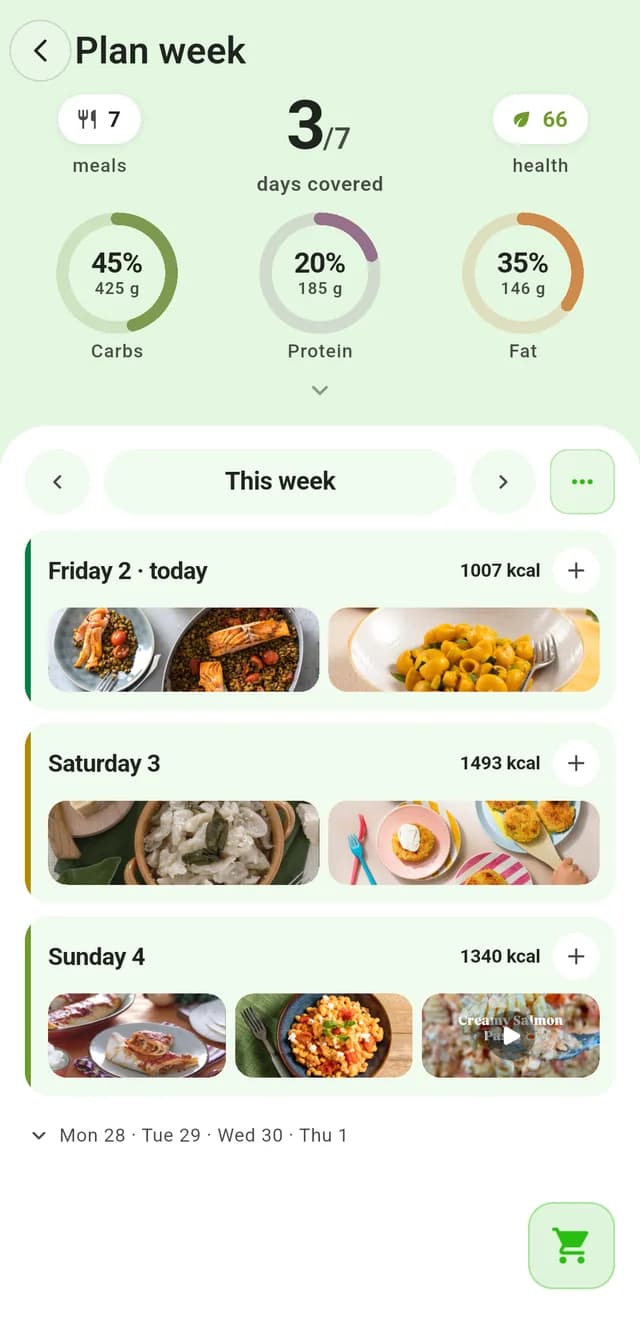
Plan the week
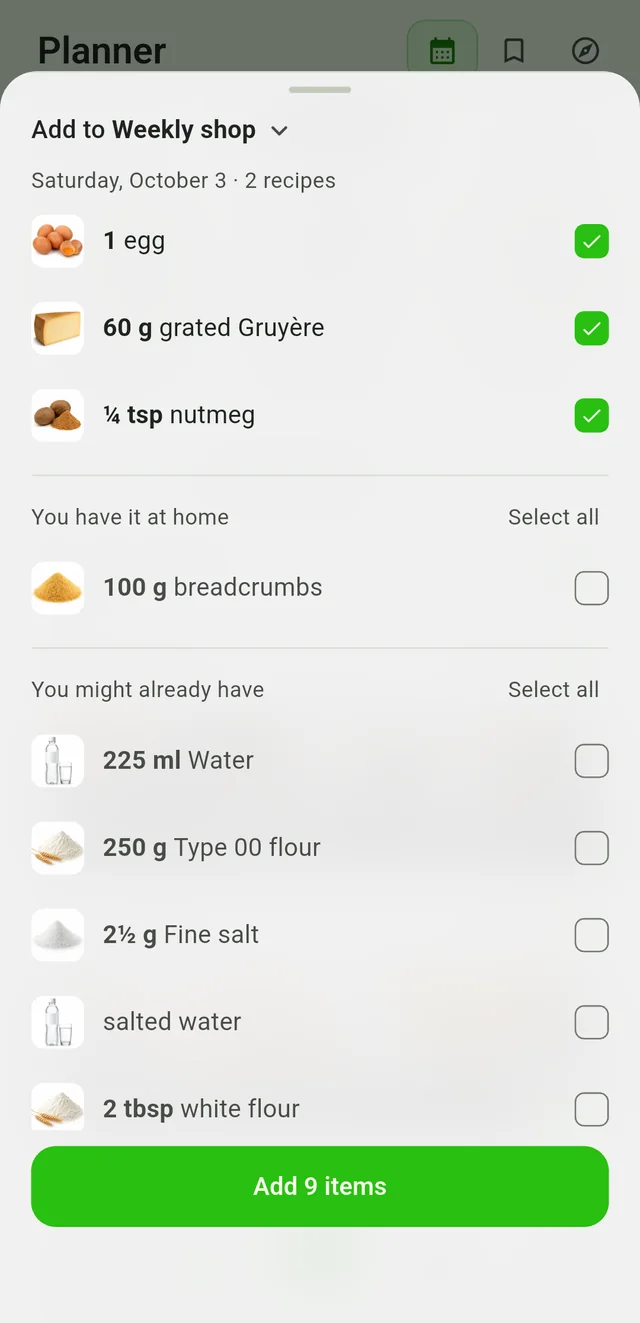
Send the ingredients to your list
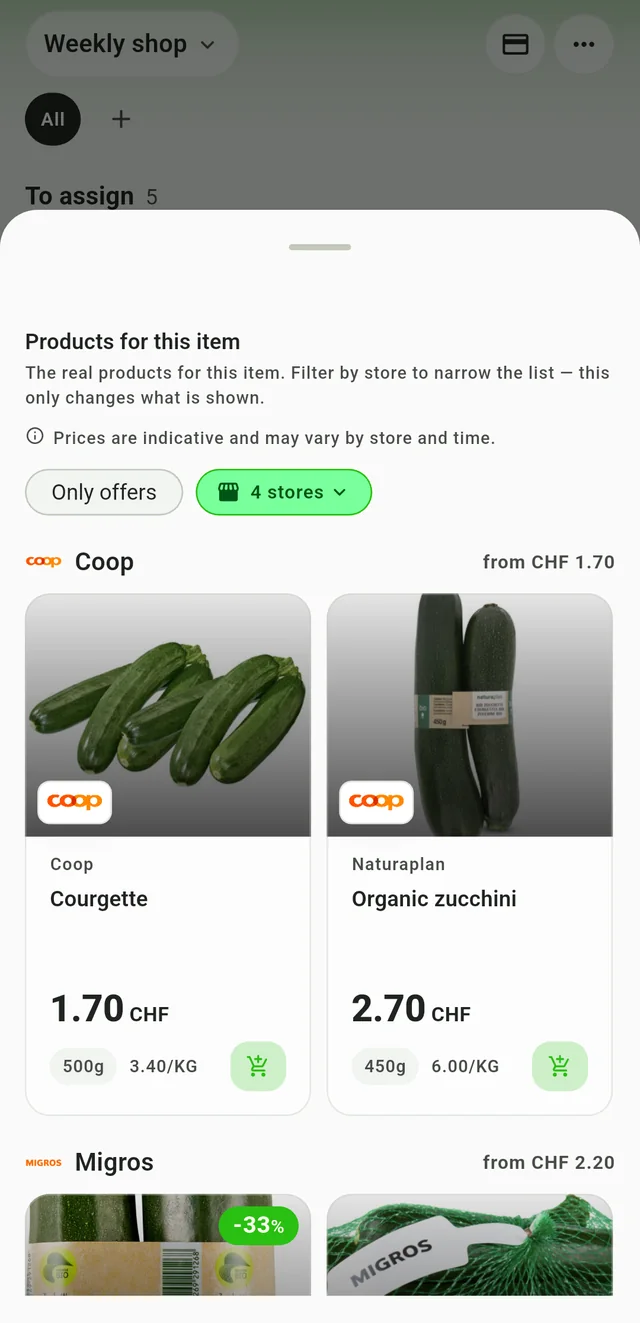
See which store has them on offer
How does Rappn’s meal planner work, step by step?
The planner lives in the “Kitchen” tab of the bottom bar in the Rappn app for iOS and Android. The names below are the ones you see on screen:
- Open the day’s “Planner”. Each day has four slots: Breakfast, Lunch, Dinner and Snack. Every planned recipe shows kcal, minutes and servings; the day adds up kcal, carbs, protein and fat and shows a health score. These are recipe data, not nutrition advice.
- Look at the week. In “Plan week” you see the days with their planned meals and a counter such as “3/7 days covered”, so you can tell at once which evenings are still open.
- Schedule a recipe. In the “Explore” section pick a recipe (with filters for category, time and difficulty), choose to add it to your plan and answer “When are you cooking it?”. Pick the day and the meal, then “Add to plan”. If you change the servings in the recipe, the quantities rescale.
- From plan to list. Pick a day: the app lists the ingredients of its recipes and sets aside two groups, “You have it at home” and “You might already have”, which holds basics such as salt, water and flour. Items in these two groups start unticked. You tick what you need and tap “Add N items”: they go into a cart such as “Weekly shop”.
- Real products for every item. On the list, tap an item and open “Products for this item”: real supermarket products with price and price per kilo, the “Only offers” filter and a choice of which stores to see. Items that do not have a store yet sit under “To assign”. The app notes that prices are indicative and may vary by store and time.
- Share the list. A cart can be shared with your family or flatmates, and you can keep several, for example one for the weekly shop and one for a dinner with guests. While you shop, you mark what you have already bought.
The fifth step is the one that makes the difference: the plan decides what you need, and the list shows you where each ingredient is on offer. If you want the method without an app, the guide on how to meal plan in Switzerland explains it from the start, and the one on how to turn recipes into a shopping list goes deeper on the fourth step.
Paper, recipe app, single-chain app or Rappn’s Kitchen: which one to choose?
| Option | How you plan | Strong point | Limit | Cost |
|---|---|---|---|---|
| Paper or PDF plan | You write the dishes in a template and the list by hand | No app, total freedom, sits on the fridge | No prices; you hunt for deals in the flyers yourself; the list does not share itself | free |
| Generic recipe and menu app | You pick recipes, the app builds the plan and the list | Lots of recipes, structure, serving calculations | Usually does not know the weekly deals of Swiss supermarkets | varies, some are subscriptions |
| Single-chain app | You use one chain’s recipes, deals and list | Tied to that chain’s loyalty card and range | Shows only that chain’s deals | free |
| Rappn’s Kitchen | You plan by day and week, send the ingredients to the list, look at products per item | Plan, shared list and deals from several supermarkets in the same app | No cost per meal or per week; indicative prices; recipes come from external publishers | free |
When is the best time to plan the week’s menu?
The deals cycle sets the right moment. Since 5 February 2026, Migros promotions start on Thursday and run until the Wednesday of the following week (Migros press release); Denner moved the start of its promotions from Tuesday to Thursday at the same time, and Coop had switched to this rhythm about a year earlier. If you plan on a Tuesday, at these three chains you are looking at deals that are about to end. The best window is Wednesday evening to Thursday. How promotions are spread across the year is in the Swiss supermarket promotion calendar.
Planning also helps against food waste. savefood.ch recommends a simple weekly plan with a shopping list, because it saves time and lets you use everything you buy. According to foodwaste.ch, households throw away about 80 kilos of food per person a year, worth about CHF 600 (ZHAW/BAFU interim report 2025). One practical tip: leave two evenings free, one for leftovers and one as a spare. A plan of seven fixed dinners is the one that breaks first.
What to cook with this week's offers?
| If on offer | Dishes that fit | Low-cost sides |
|---|---|---|
| Chicken | Curry, tray bake, salad | Rice, seasonal vegetables |
| Mince | Bolognese, meatballs, chili | Own-brand pasta, beans |
| Fish | Oven-baked or pan-fried fish | Potatoes, seasonal vegetables |
| Eggs | Frittata, shakshuka | Bread, leftover vegetables |
| Seasonal vegetables | Soup, gratin, stir-fry | Eggs, potatoes |
Once you have picked the dish, add it with “Add to plan” and send the ingredients from the plan to your list.
What does Rappn’s meal planner not do?
A plan only works if you know what to expect. Three limits:
- It does not calculate the cost of a meal or of the week. Only the list has an estimated price, and prices are indicative.
- It gives no medical or nutrition advice. Kcal, macros and the health score are recipe data. For a medical diet, for example coeliac disease or intolerances, follow a professional’s advice.
- It does not publish its own recipes. Recipes come from external publishers, named in the app.
Where to start this week?
If it is your first time, start with three dinners, not seven. Pick recipes from the recipes, look at the deals of the week and read the guide to planning the weekly grocery shop. If you cook for several people, the family meal plan gives quantities and day order; if budget is your starting point, the budget weekly meal plan shows the method. And when you want to do it all in one place: plan the week in Rappn’s Kitchen, send the ingredients to your list and see where they are on offer.
Rappn is building an AI assistant for groceries: you can join the waitlist.
Updated: .
Why Rappn?
Rappn is an independent grocery price comparison app in Switzerland, with no commercial agreements with any retailer. Our comparisons are truly independent.
- 100% free: no subscription, no hidden costs
- Neutral: no commercial agreements with Migros, Coop, Aldi, Lidl, Denner, Aligro, or Otto’s
- Updated daily, as soon as the chains publish their deals
- The chains’ deals in one place: search, filter, compare, no subscription
- Meal planner in the Kitchen tab: plan the week, send the ingredients to your list

Ready to save on groceries?
Install Rappn and compare for yourself this week. No account required.Scan the code, install Rappn and compare current offers. No account needed.




Frequently Asked Questions
Can Rappn create a meal plan?
Yes. In the “Kitchen” tab the planner can create the weekly meal plan automatically, and you can change one meal or all of them by hand, or have them suggested again. You plan breakfast, lunch, dinner and snack for each day and see the week with the days already covered. You can also choose the recipes yourself in “Explore” and schedule them with “Add to plan”.
Does Rappn plan the week around the deals?
The deals come into play on the list: you plan the meals, send the ingredients to your list and, for each item, the app shows real supermarket products with the “Only offers” filter. That way you see where an ingredient is on offer this week. Prices are indicative and vary by store and time.
Is the meal planner free?
Yes. Rappn is free, you do not need an account to browse the deals, and no chain pays for it. The planner is part of the Rappn app for iOS and Android.
Is there a shopping list for the whole family?
Yes. In Rappn a list is a cart you can share with your family or flatmates, and you can keep several, for example one for the weekly shop and one for a dinner. What you share is the cart, that is, the shopping list.
When is the best time to plan the week’s menu in Switzerland?
From Wednesday evening to Thursday. Since 5 February 2026 Migros and Denner promotions start on Thursday and run until the following Wednesday (Migros press release); Coop had switched to this rhythm about a year earlier. Plan on Thursday and you are looking at deals that have just started.
Does the planner calculate calories and nutritional values?
Each planned recipe shows kcal, minutes and servings, and the day shows kcal, carbs, protein, fat and a health score (all recipe data). They are not medical advice: for a medical diet, follow a professional’s advice.