
How do you make a voice shopping list with Alexa, Siri and Google?
You can dictate a shopping list to Alexa, Siri and Google, but each saves it in a different place: Alexa in Amazon’s shopping list, Siri in Apple’s Reminders app, Google in Google Keep (provider pages, viewed on 21 October 2026). For Switzerland, Amazon lists its Echo devices in English (US), French, German and Italian and Apple lists Siri in French, German and Italian; Google gives Gemini’s languages and countries in two separate lists. Voice recordings have settings of their own at each provider, described on its privacy page.
Rappn compares the current promotions of 7 Swiss retailers, updated daily: free, no subscription.
Make your list in Rappn, freeYes: you can dictate a shopping list to Alexa, Siri and Google, but each saves it in a different place and shares it in its own way. Alexa uses Amazon’s shopping list, Siri uses Apple’s Reminders app, Google uses Google Keep. For Switzerland, Amazon and Apple list French, German and Italian; for Google see the table.
Updated October 2026. Sources: Amazon (shopping list, privacy), Apple (Siri and Reminders, privacy) and Google (Gemini and Keep, privacy), plus the pages linked in the table, all viewed on 21 October 2026.
How do you make a shopping list by voice?
A voice shopping list is a list you add items to by speaking to an assistant instead of typing: you tell it what to add and to which list, and it writes the items. You need no third-party app: each assistant writes to its maker’s own app. You need an account with the provider and a supported language. A dictated list gives you items, not prices or this week’s promotions: the provider pages read for this guide mention neither. For a list written by a chatbot there is the guide to an AI grocery list, and for comparing dedicated list apps the one on shopping list apps.
This is a shopping list in Rappn: each item with a starting price, an estimated price for the whole list, and the items you have bought ticked off.
Make your list in Rappn, freeFree, no subscription · iOS & Android
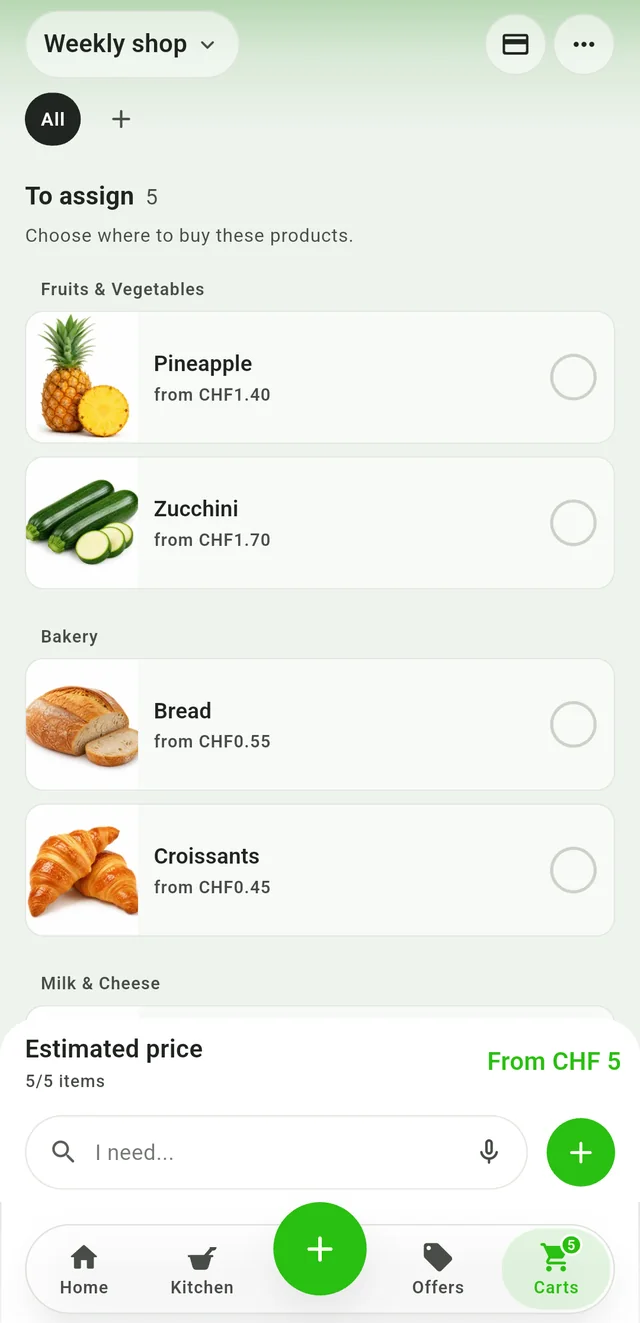
Estimate the list
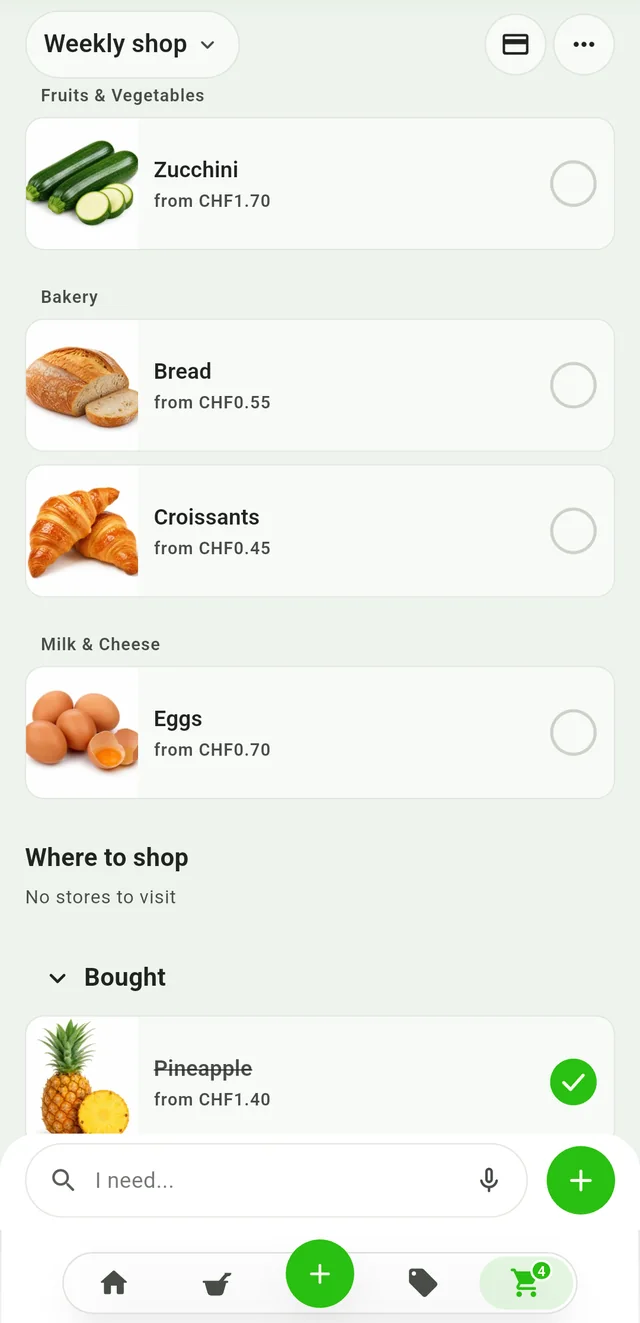
Tick off what you bought
Alexa, Siri and Google: where does the list end up?
| Provider (assistant) | Where the list ends up | Languages listed for Switzerland | Sharing |
|---|---|---|---|
| Amazon (Alexa) | In Alexa’s shopping list, visible on Echo devices and in the Alexa and Amazon apps | Echo “International Version”: English (US), French, German, Italian; the list of features is not exhaustive and can change | By text message or email with family members |
| Apple (Siri) | In the Reminders app, in a list of type Groceries (iOS 17 and later, iCloud needed) | Siri: Switzerland (French, German, Italian), per the iOS 27 availability page | By iCloud invitation: whoever accepts can add, edit and complete items |
| Google (Assistant and Gemini) | In Google Keep, where the Assistant’s lists are saved too; Gemini creates lists and adds items to existing ones | Gemini: Switzerland among the countries (Android, iPhone and iPad); English, French, German and Italian among the languages, not matched to countries | From Keep, with collaborators; Gemini cannot share notes and lists |
Dictating the list, step by step
Four steps, with the providers’ own example sentences.
- Prepare the list. Amazon: the page describes no preparation step. Apple: in Reminders create a list, tap List Type and choose Groceries (iCloud needed). Google: connect the Google Workspace app, which includes Keep, to Gemini under connected apps; you must be signed in to Gemini and have the Keep Activity setting on.
- Say the sentence. Activate the assistant as usual, then name the action, the items and the list. Examples from the providers: Amazon “Add eggs to my shopping list”; Apple “Add artichokes to my groceries list”; Google, with Gemini, “Add [item 1, item 2, …] to my list called [list name]” and, with Google Assistant, “Create a list called [store] shopping”. With Gemini you can also say “Hey Google”, if “Hey Google” and Voice Match are set up.
- Check the result. Review items and quantities in the app, brand names above all. Google warns that Gemini apps can be wrong or give outdated information, and offers Undo in the confirmation notification.
- Share the list. That goes through the list’s app, as in the table. The rest is in the guide to the shared shopping list.
Dialect, French, Italian: what does the assistant understand?
French and Italian are listed for Switzerland by Amazon and Apple, and among Gemini’s languages by Google. The providers’ pages list languages and regional variants, such as Apple’s “German (Switzerland)”, but none names Swiss German or dialects. What speech recognition and AI do with dialects today is explained in the guide to AI and Swiss German. For items in a language other than the phone’s system language, Apple writes that you can add a supported language in Settings; for Google, the availability of connected apps varies by location, language, device and Gemini app, so test with two or three items.
Voice recordings and privacy
Key points from the providers’ privacy pages, in alphabetical order and without judgement.
- Amazon. When Alexa hears the wake word, the recording goes to Amazon’s cloud. In the Alexa app (More › Alexa Privacy) you can review and delete recordings, have them deleted after 3 or 18 months, or choose not to save them: the transcripts are then kept for 30 days. Humans review an extremely small sample of interactions.
- Apple (page of 14 September 2026). Siri’s settings show whether what you say is processed on the device; otherwise the audio goes to Apple’s servers, which keep it only if you turn on “Improve Siri and Dictation”. Transcripts may stay for up to two years (a small reviewed sample longer); the history on the device is deleted under Settings › Siri › Siri & Dictation History.
- Google (Privacy Hub of 19 October 2026). With Keep Activity on, saved activity also includes audio; by default the audio is not used to improve Google services, but you can allow that in Gemini Apps Activity, where auto-delete defaults to 18 months (alternatives: 3, 36 or never). Chats reviewed by human reviewers are kept for up to three years, even if you delete your activity.
From a spoken list to the shop: keeping both together
Pick one place for the list and check it before you leave. Rappn, a free Swiss app (iOS and Android) that compares the current promotions of seven Swiss retailers and turns receipts into a spending overview, has a list: you type in the items, share it with your household and edit it together; it shows an estimated price and, for each item, products with prices by store (prices are indicative). Rappn covers groceries only, not rent, insurance or taxes. Rappn is building an AI assistant for groceries: you can join the waitlist.
Updated: .
Why Rappn?
Rappn is an independent grocery price comparison app in Switzerland, with no commercial agreements with any retailer. Our comparisons are truly independent.
- 100% free: no subscription, no hidden costs
- Neutral: no commercial agreements with Migros, Coop, Aldi, Lidl, Denner, Aligro, or Otto’s
- Updated daily, as soon as the chains publish their deals
- The chains’ deals in one place: search, filter, compare, no subscription
- Meal planner in the Kitchen tab: plan the week, send the ingredients to your list

Ready to save on groceries?
Install Rappn and compare for yourself this week. No account required.Scan the code, install Rappn and compare current offers. No account needed.



Frequently Asked Questions
Does Alexa work in Switzerland for the shopping list?
Amazon documents it, with limits: Switzerland is among the regions for “International Version” Echo devices (English US, French, German, Italian) and the to-do/shopping list is among the generally supported features. The list of features is not exhaustive, can change, and “Shopping” is not supported; the Alexa app is also not available in every region, so check your app store (page viewed on 21 October 2026).
Can I dictate my shopping list to Siri?
Yes. Apple gives “Add artichokes to my groceries list” as an example; a Groceries list in Reminders sorts items into categories by itself and needs Reminders in iCloud. For Switzerland, Apple lists Siri in French, German and Italian (pages viewed on 21 October 2026).
Where does Google’s shopping list end up?
In Google Keep. Google writes that the Assistant’s shopping list and notes are now saved in Keep, and that Gemini creates lists in Keep and adds items to existing ones if you are signed in to Gemini, have connected the Google Workspace app and have the Keep Activity setting on.
Do voice assistants understand Swiss German?
The providers’ pages list languages and regional variants, not dialects: Amazon lists German for Switzerland, Apple lists Siri for Switzerland in French, German and Italian and dictation also as “German (Switzerland)”, Google lists German among Gemini’s languages. None names Swiss German or dialects or says whether “German (Switzerland)” covers dialect; the guide to AI and Swiss German covers what is known today.
How do I share the list with my household?
It depends on the app: Alexa by text message or email, Reminders by iCloud invitation, Keep with collaborators (Gemini cannot share). In Rappn you share a list with your household and edit it together; the details are in the guide to the shared shopping list.